
Match the label
Resolve the record behind a barcode before changing stock.
Warehouse operations
Use supported phone-camera, tablet, and keyboard-style scanner input for receiving, putaway, transfers, picking, and counts.
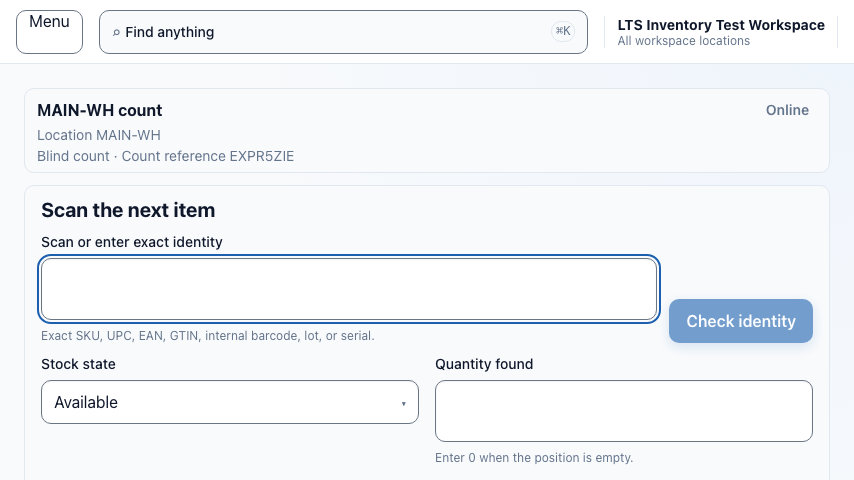
Resolve before you move
A scan can identify an item, serial unit, container, bin, or task. The next screen names what was found and presents the permitted action, so a label never has to stand in for a guess.
Resolve the record behind a barcode before changing stock.
See its location, quantity, and pending work in one decision point.
Receive, move, pick, or count only after the entity is clear.
Purchase order receiving
Start from the expected line, scan what arrived, and record exceptions without losing the receiving context.
Use the expected lines as the receiving checklist.
Confirm each item or serial unit against the line.
Short, over, or damaged arrivals remain visible for follow-up.
Guided putaway
The task tells the operator what was received, where it should go, and which scan closes the move. The ledger preserves the before and after locations.
Location control
A transfer leaves its source intentionally, carries an in-transit state, and is received at the destination. Teams can see what is moving without counting it twice.
Confirm the source and move stock to in-transit.
Keep the transfer visible while it is between locations.
Scan at the destination to complete the handoff.
Directed work
Pick tasks show the next item and location. Count tasks prompt the expected bin, capture the observed quantity, and leave a reviewable record when it differs.

Connectivity-aware status
When a connection drops, the interface can identify an action as pending instead of pretending it is final. Plan-aware offline replay is deferred and is not currently claimed as available.
Controlled devices
Control includes the current supported boundary for registering, reviewing, and revoking durable device records. Plan-aware registered hardware-scanner execution remains deferred.
Associate a supported device record with its workspace context.
Review durable device records in the implemented boundary.
Revoke a supported record without rewriting its history.
Use the hardware already at hand
Review purchase orders, exceptions, and warehouse activity.
Run receiving and putaway where work happens.
Use keyboard-style barcode scanners at a fixed station.
Use a camera for quick scans and task updates.